> ## Documentation Index
> Fetch the complete documentation index at: https://docs.pixvow.com/llms.txt
> Use this file to discover all available pages before exploring further.
# Managing your Event
> Your central command center for managing every aspect of your event
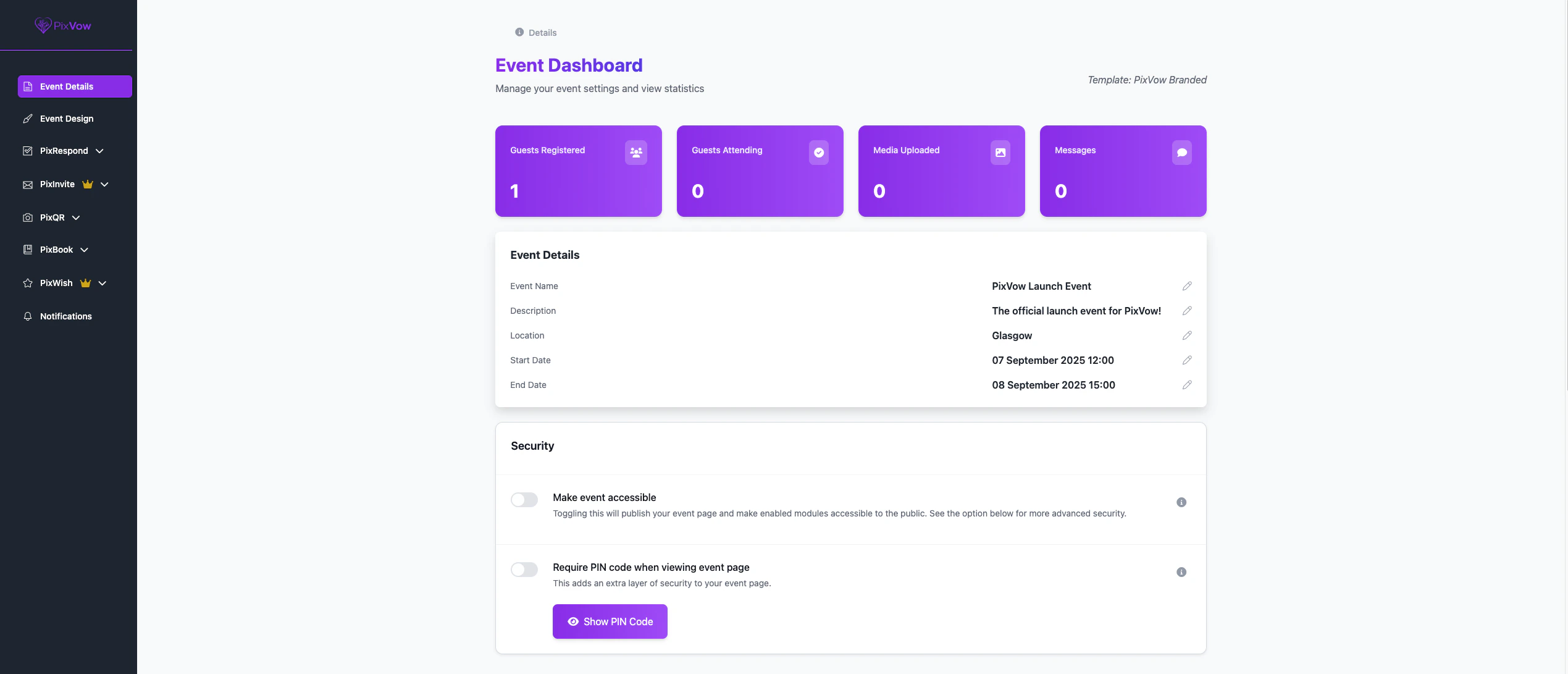
The Host Dashboard is your all-in-one control center for managing every aspect of your event. It's where the magic happens, allowing you to oversee and control all the details that make your event unique.
 ## Accessing the Host Dashboard
You can access the Host Dashboard in two ways:
1. **After Event Creation**: Once you've created a new event, you'll be automatically directed to the Host Dashboard for that event.
2. **Through My Events Page**: For any existing event, you can access its Host Dashboard by going to the [My Events page](https://pixvow.com/account/events) and selecting the 'Open Host Dashboard' from the drop-down next to the event you want to manage.
## Features of the Host Dashboard
The Host Dashboard is your central hub for managing all aspects of your event. Here's what you can do:
### AI Summary & Suggestions
PixAssist provides an AI-generated summary of your event and offers suggestions to enhance your event planning experience. This refreshes every 24 hours and provides insights based on your event details.
Summary is available on the Starter and above plans
### Event Details Management
* View and edit event name, description, date, time, and location
* Update event type and theme
* Manage event privacy settings
### Guest Management
* View and manage your guest list
* Track RSVPs and guest responses
* Monitor guest registration statistics
### Feature Controls
Access and manage all PixVow features associated with your event:
* **PixRespond**: Set up and manage your RSVP system
* **PixInvite**: Design, customize, and send out your digital invitations
* **PixQR & PixChallenge**: Manage media uploaded by your guests and generate challenges like best dancer
* **PixWish**: Create and oversee gift registries and wishlists
* **PixBook**: Handle guest book messages
* **PixAssist**: Utilize AI-powered assistance for event planning
### Analytics and Insights
* View real-time statistics on guest engagement & responses
* Track invitation opens and responses
* View notifications about your event
### Settings and Customisation
* Customise the look and feel of your event page
* Manage the privacy settings of your event
* Manage notification preferences
## Privacy & Security
The privacy and security of your event is paramount, you're in control on who can see & access your event. For more information, visit our [Event Privacy & Security](/events/host/privacy-and-security) page.
## Making the Most of Your Host Dashboard
Your Host Dashboard is designed to be intuitive and user-friendly. Here are some tips to maximize its potential:
1. **Regular Check-ins**: Make it a habit to regularly review your dashboard for updates and pending tasks.
2. **Utilize PixAssist**: Let our AI-powered assistant guide you through optimizing your event planning.
3. **Explore All Features**: Each tab in your dashboard offers unique functionalities. Take time to explore them all.
Remember, the Host Dashboard is your command center. The more you engage with it, the smoother your event planning and management will be.
Need help navigating your Host Dashboard? Our [support team](https://pixvow.com/contact) is always ready to assist you!
## Accessing the Host Dashboard
You can access the Host Dashboard in two ways:
1. **After Event Creation**: Once you've created a new event, you'll be automatically directed to the Host Dashboard for that event.
2. **Through My Events Page**: For any existing event, you can access its Host Dashboard by going to the [My Events page](https://pixvow.com/account/events) and selecting the 'Open Host Dashboard' from the drop-down next to the event you want to manage.
## Features of the Host Dashboard
The Host Dashboard is your central hub for managing all aspects of your event. Here's what you can do:
### AI Summary & Suggestions
PixAssist provides an AI-generated summary of your event and offers suggestions to enhance your event planning experience. This refreshes every 24 hours and provides insights based on your event details.
Summary is available on the Starter and above plans
### Event Details Management
* View and edit event name, description, date, time, and location
* Update event type and theme
* Manage event privacy settings
### Guest Management
* View and manage your guest list
* Track RSVPs and guest responses
* Monitor guest registration statistics
### Feature Controls
Access and manage all PixVow features associated with your event:
* **PixRespond**: Set up and manage your RSVP system
* **PixInvite**: Design, customize, and send out your digital invitations
* **PixQR & PixChallenge**: Manage media uploaded by your guests and generate challenges like best dancer
* **PixWish**: Create and oversee gift registries and wishlists
* **PixBook**: Handle guest book messages
* **PixAssist**: Utilize AI-powered assistance for event planning
### Analytics and Insights
* View real-time statistics on guest engagement & responses
* Track invitation opens and responses
* View notifications about your event
### Settings and Customisation
* Customise the look and feel of your event page
* Manage the privacy settings of your event
* Manage notification preferences
## Privacy & Security
The privacy and security of your event is paramount, you're in control on who can see & access your event. For more information, visit our [Event Privacy & Security](/events/host/privacy-and-security) page.
## Making the Most of Your Host Dashboard
Your Host Dashboard is designed to be intuitive and user-friendly. Here are some tips to maximize its potential:
1. **Regular Check-ins**: Make it a habit to regularly review your dashboard for updates and pending tasks.
2. **Utilize PixAssist**: Let our AI-powered assistant guide you through optimizing your event planning.
3. **Explore All Features**: Each tab in your dashboard offers unique functionalities. Take time to explore them all.
Remember, the Host Dashboard is your command center. The more you engage with it, the smoother your event planning and management will be.
Need help navigating your Host Dashboard? Our [support team](https://pixvow.com/contact) is always ready to assist you!